
Guides
Binance Convert Fees: Is It Really Zero Fee? How to Compare a Convert Quote With Spot (2026)
Binance Convert charges no separate trading fee, but the cost is built into the quoted rate. See what Binance officially says, what a regular user pays on a spot market order, and a one-minute check to find which route gives you more coins.
Last reviewed: September 30, 2026. Binance can change Convert pricing, limits and spot fee rates at any time, and availability depends on your region. The live quote and fee page for your own account are authoritative.
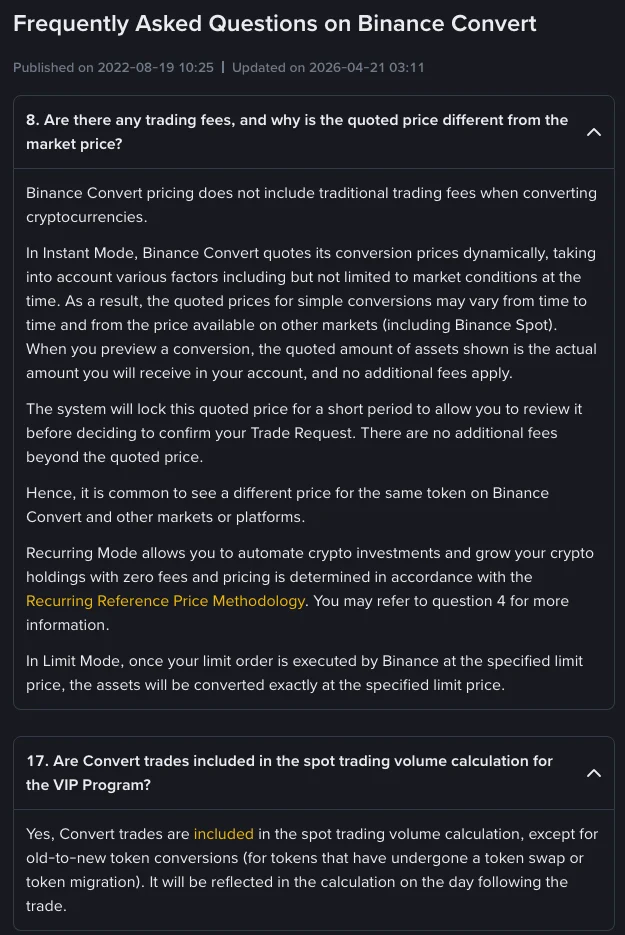
Does Binance Convert charge a fee? Not as a separate line item. Binance's own Convert FAQ says Convert pricing "does not include traditional trading fees", and that the amount shown in the preview is the amount you actually receive. That does not make a conversion free: the cost sits inside the quoted rate, so you cannot see it unless you compare the quote with the spot market at the same moment.
This guide explains what Binance officially says about Convert pricing, what the equivalent spot trade costs a regular user, and a simple way to check which route gives you more coins before you confirm.
What Binance officially says about Convert fees
The answer comes from question 8 of Binance's Frequently Asked Questions on Binance Convert (updated April 21, 2026). In short:
- Instant mode: there is no traditional trading fee. Binance quotes a price "dynamically", taking market conditions and other factors into account, so the quote "may vary from time to time and from the price available on other markets (including Binance Spot)". The quote is locked for a short countdown while you review it, and no fees are added on top.
- Recurring mode: described as having zero fees, with pricing set by Binance's Recurring Reference Price Methodology.
- Limit mode: once Binance executes your limit order, the assets are converted exactly at the limit price you set.
Question 17 of the same FAQ adds a detail many people miss: Convert trades count toward your spot trading volume for the VIP program (except old-to-new token migrations), and the volume shows up the day after the trade.
So "zero fee" is accurate as Binance words it. "Zero cost" is not. Any gap between the Convert quote and the fair market price is a cost to you, even though it never appears as a fee.
What the same trade costs on the spot market
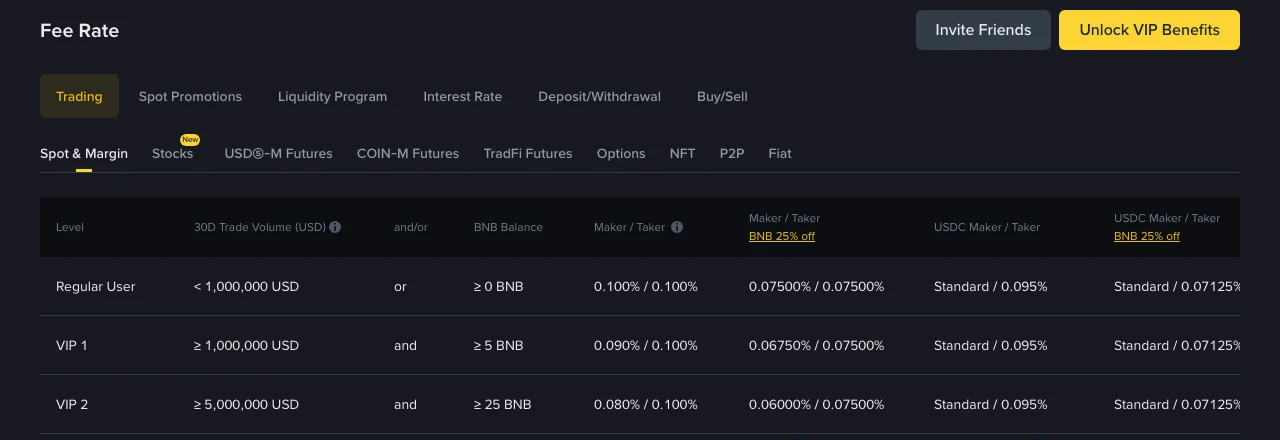
To judge a Convert quote, you need to know what the alternative costs. On Binance's official fee schedule, checked on September 30, 2026, the Spot & Margin tab lists:
| Account level | Maker / Taker | With BNB fee payment (25% off) |
|---|---|---|
| Regular user (under 1,000,000 USD 30-day volume) | 0.100% / 0.100% | 0.075% / 0.075% |
| VIP 1 | 0.090% / 0.100% | 0.0675% / 0.075% |
| VIP 2 | 0.080% / 0.100% | 0.060% / 0.075% |
Two things stand out for beginners:
- For a regular user, maker and taker cost the same (0.100%). A limit order does not get you a lower fee rate at this level. It only controls the price you trade at. The maker/taker split starts to matter from VIP 1.
- Paying fees in BNB is the only discount that applies to every account from day one. Other ways to lower spot fees are covered in our guide to reducing Binance trading fees.
The other part of a spot trade's cost is the bid-ask spread. We pulled best bid and ask prices from Binance's public market-data endpoint (/api/v3/ticker/bookTicker, no account needed) on September 30, 2026 at 07:37 UTC:
| Pair | Best bid | Best ask | Spread |
|---|---|---|---|
| BTC/USDT | 83,408.00 | 83,408.01 | ≈0.00001% |
| ETH/USDT | 2,674.62 | 2,674.63 | ≈0.0004% |
| BNB/USDT | 759.78 | 759.79 | ≈0.001% |
| USDC/USDT | 1.00043 | 1.00044 | ≈0.001% |
This is one snapshot, not a promise. Spreads widen in fast markets, and a large order can use up the best price and fill further down the order book. But on major pairs the spread is tiny compared with the 0.100% fee. For a small market order on a major pair, the fee is almost the whole cost.
A worked example: 1,000 USDT into BTC
Using the snapshot above, here is what a regular user who does not pay fees in BNB would get from a spot market buy:
- 1,000 USDT ÷ 83,408.01 (best ask) ≈ 0.0119892 BTC before fees
- Taker fee 0.100% ≈ 0.0000120 BTC (about 1.00 USDT)
- Received ≈ 0.0119772 BTC
With BNB fee payment switched on, the fee drops to about 0.75 USDT worth, and the fee is paid in BNB instead of being taken from the BTC you receive.
That gives you a clear benchmark. If the Convert preview for 1,000 USDT offers more than about 0.011977 BTC at the same moment, Convert is the cheaper route. If it offers less, the spot market order is cheaper. These figures come from one moment in time. Always compare quotes taken seconds apart, not a quote with a price you saw earlier.
How to check a Convert quote yourself
You can do this check in under a minute before any conversion:
- Open Convert, enter the amount, and look at the preview. Note the exact amount you would receive.
- Without waiting for the countdown to run out, open the spot market for the same pair and note the best ask (when buying) or best bid (when selling).
- Work out what spot would give you: amount ÷ best ask × (1 − your taker fee) when buying, or amount × best bid × (1 − your taker fee) when selling.
- Compare the two numbers. The larger one is the better deal for that size at that moment.
If you want Convert's hidden cost as a percentage, use: 1 − (Convert amount received ÷ amount you would get at the mid-price), where the mid-price is halfway between best bid and best ask. Compare that percentage with your spot taker fee.
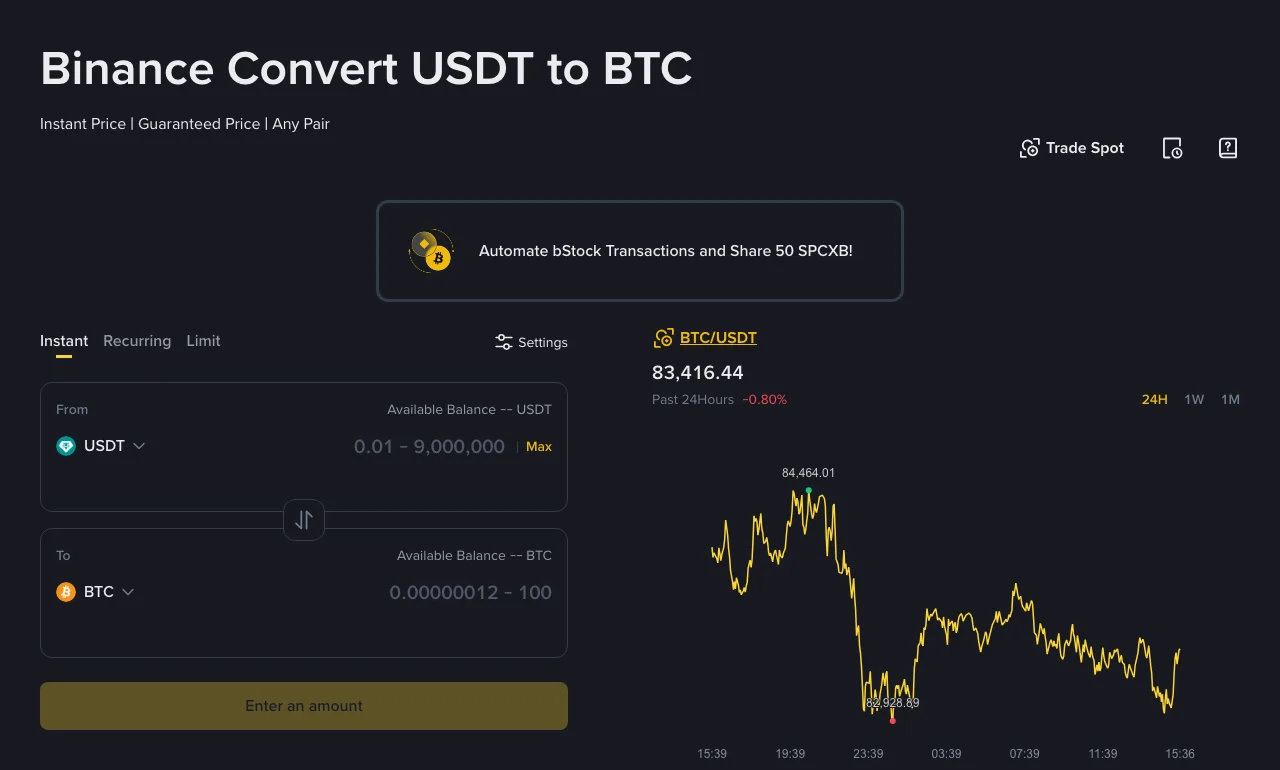
The screenshot also shows the allowed amount range for the pair (0.01 to 9,000,000 USDT for USDT to BTC when we captured it). Binance's FAQ says minimum and maximum amounts depend on the pair, so check the range shown for your pair.
When Convert is still the sensible choice
A small hidden spread is not always a reason to avoid Convert:
- Pairs with no direct spot market. Convert quotes pairs directly. On spot, the same swap might take two trades (for example, token A to USDT, then USDT to token B), which means paying the taker fee twice.
- Small leftover balances. Convert works for small amounts, and it saves you from rounding problems and minimum order sizes.
- Order-entry mistakes. A locked quote removes the risk of typing a wrong limit price or getting partly filled. For a beginner, that protection can be worth more than a few basis points.
- Scheduled buying. Recurring mode is officially zero-fee, which suits dollar-cost averaging. Just remember the price follows Binance's reference methodology, not a price you choose.
Spot usually wins for larger swaps on liquid pairs, especially once your fee rate drops through BNB payment or a VIP level. Because Convert volume counts toward VIP volume, you do not lose progress toward a VIP level by using Convert.
Practical notes before you convert
- Funding source order: if you select several wallets, Binance takes funds from the Spot Wallet first, then the Funding Wallet, then Earn Flexible Savings (FAQ question 7). Check this if you do not want to redeem savings.
- Trade records: Convert trades are listed under Orders → Convert History, which shows up to 90 days.
- Withdrawal costs are separate. A good conversion rate can be undone by a costly withdrawal network. See our breakdown of Binance withdrawal fees by network before you move the coins out.
- Comparing exchanges: OKX also markets its Convert tool as fee-free and publishes a maximum spread in its disclosure. We covered that in our look at OKX zero-fee pairs and Convert spreads. Binance's Convert FAQ does not state a maximum spread, which is one more reason to compare live quotes.
FAQ
Is Binance Convert really free? There is no separate trading fee, and nothing is added on top of the quoted amount. The cost is built into the quoted rate, which can differ from the spot price. Compare the preview with the spot order book to see how big that difference is.
Is Convert cheaper than a spot market order on Binance? Sometimes. For a regular user, a spot market order costs about 0.100% in fees plus a very small spread on major pairs. Convert is cheaper when its quote is closer to the market than that. The only reliable test is to compare both at the same moment for the same amount.
Do Convert trades count toward Binance VIP volume? Yes. Binance's Convert FAQ says Convert trades are included in spot trading volume for the VIP program, except old-to-new token migrations, and the volume shows up the following day.
Does a Convert limit order charge a fee? Binance says Limit mode converts assets exactly at your specified limit price once executed, and Convert pricing does not include traditional trading fees. Your limit order may not fill if the market never reaches your price.
Risk notice
The fee rates and prices in this article come from Binance's public fee schedule and public market-data endpoint on September 30, 2026, and from Binance's Convert FAQ updated April 21, 2026. Rates, quotes, limits and product availability can change and vary by region. Crypto prices are volatile, and nothing here is investment advice. Check the live figures in your own account before trading.