
Guides
Does Binance Charge Deposit Fees? Minimum Deposits and Why a Deposit Isn't Credited (2026)
Binance does not charge crypto deposit fees, but the sender may still pay a withdrawal fee and gas. Learn why the minimum deposit matters more than the fee, the 5 reasons Binance lists for uncredited deposits, and which mistakes can be recovered.
Checked on September 29, 2026. This is an independent learning resource with no affiliation to Binance, and it is not investment, legal or tax advice. Deposit rules, minimum amounts and supported networks can change and may differ by region, so treat what your own deposit page shows as final.
"Does Binance charge a fee when I deposit USDT?" The short answer is no: Binance does not charge deposit fees for crypto. But that one sentence leaves out the part that actually costs beginners money. Most lost deposits have nothing to do with fees. They come from sending less than the minimum deposit amount, forgetting a memo, or picking a network Binance does not support. Binance charges nothing for these mistakes, but the funds may never be credited, and some of them cannot be recovered at all.
This guide collects the deposit rules from Binance's own pages in one place: which parts are free, which parts still cost money, the reasons Binance lists for a deposit not arriving, and what can be recovered after a mistake.
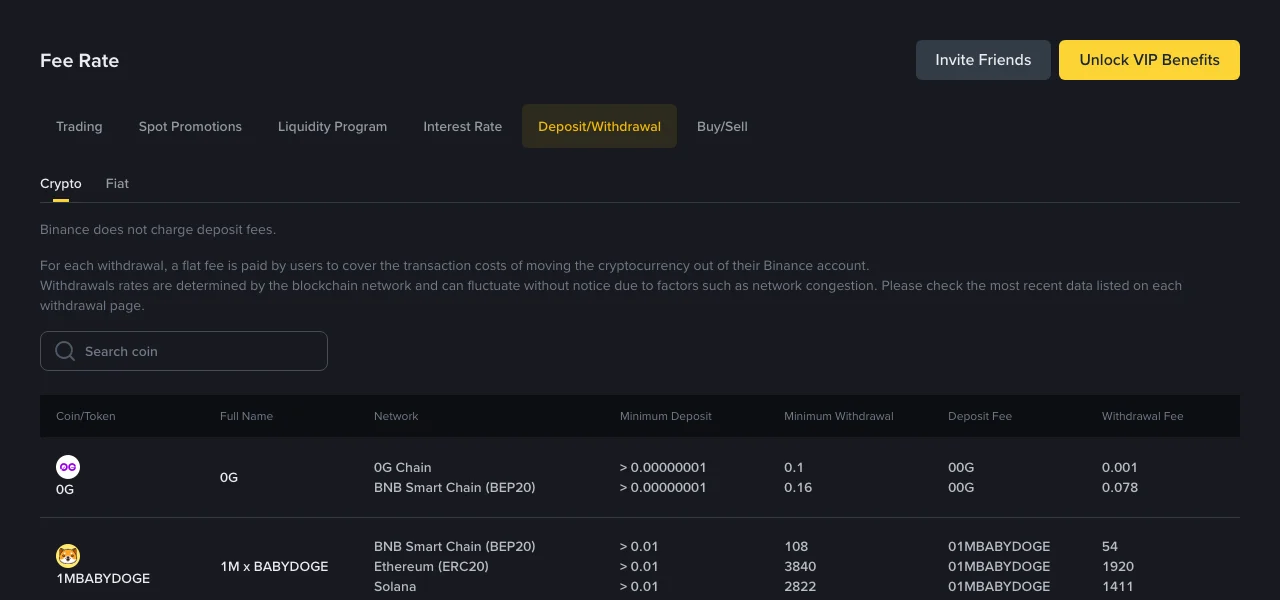
Binance's public deposit and withdrawal fee page, captured while logged out on September 29, 2026. The figures in the table are Binance's own and change over time.
Does Binance charge deposit fees? Not on its side
On the Fee Rate page, under Deposit/Withdrawal → Crypto, the first line says: "Binance does not charge deposit fees."
That statement covers Binance as the receiving side. A transfer into Binance from somewhere else can still involve two costs, and both are paid where the money leaves:
- The sending exchange's withdrawal fee. If you move coins from another exchange to Binance, that exchange usually charges its own withdrawal fee per coin and network.
- The onchain network fee (gas). If you send from your own wallet, the wallet pays the blockchain network for the transaction.
So "free deposits" does not mean "free transfers." If you want to spend less, compare networks and fees on the sending side, not on Binance.
Minimum deposit amount: the column that matters more than the fee
The same fee table has a Minimum Deposit column for every coin and network. The values start with ">", meaning the amount you deposit must be greater than that number.
Binance's help article Why Hasn't My Deposit Been Credited? lists this as reason number 4: if your deposit amount is lower than the minimum deposit amount, the crypto won't be credited to your account. The companion article Frequently Asked Questions on Incorrect Deposits is more direct: deposits that do not meet the minimum deposit amount cannot be retrieved.
Two details catch people out:
- The minimum is set per network. The same coin can have a different minimum on each network, so check the row for the network you are actually using.
- What counts is the amount that arrives, not the amount you type. Many platforms subtract their withdrawal fee from the amount you enter, so less reaches Binance than you sent. If you are close to the minimum, work from the amount after fees and leave a margin.
For ordinary-sized deposits the minimum is tiny and never gets in the way. The risky case is sweeping the last small balance out of a wallet or another exchange.
Fiat deposits and card purchases use different tabs
"No deposit fees" applies only to crypto. The same page also has a Fiat sub-tab and a separate Buy/Sell tab at the top:
- Fiat deposits and withdrawals are priced by currency, payment method and region, and the methods available vary a lot from country to country.
- Buying crypto directly with a card or another payment method counts as a purchase, not a deposit, and follows a different fee schedule.
Because these costs depend on where you live, this guide does not quote numbers for them. Check the relevant tab after logging in, and go by the total shown on the final order screen.
Binance deposit not credited: the 5 reasons Binance lists
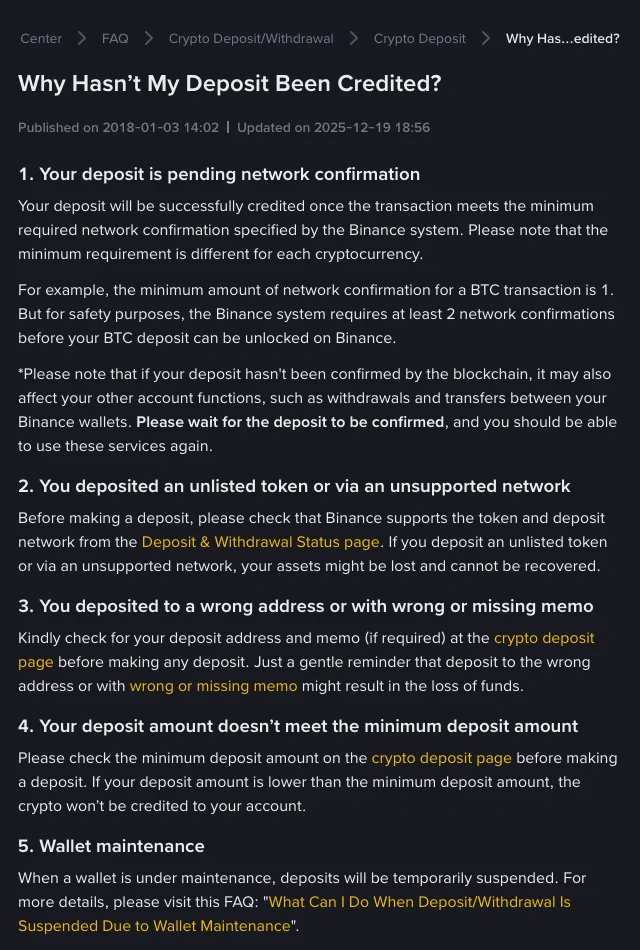
Binance Help Center, "Why Hasn't My Deposit Been Credited?", captured on September 29, 2026.
According to that article, a deposit that has not shown up is almost always one of the five cases below. The first and last usually just need time. The other three mean something may have gone wrong with the transfer itself.
| Reason | What you see | What to do |
|---|---|---|
| Pending network confirmation | The transaction is onchain but has not reached the number of confirmations Binance requires | Wait. Binance's example: a BTC transaction needs 1 network confirmation, but Binance requires at least 2 before the deposit is unlocked |
| Unlisted token or unsupported network | The deposit does not appear in your history, or looks abnormal | Before depositing, check the coin and network on the Deposit & Withdrawal Status page. Binance warns that assets sent this way might be lost and cannot be recovered |
| Wrong address, or wrong or missing memo | Successful onchain, but not credited to your account | See the next section: whether it can be recovered depends on the exact case |
| Amount below the minimum deposit | Successful onchain, but not credited | Binance says these cannot be retrieved, so the only fix is avoiding it next time |
| Wallet maintenance | Deposits for that coin are temporarily suspended | Wait for maintenance to end, or use a network that is still open |
If you are not sure which case applies, find the transaction hash (TXID) first. Look it up on a block explorer to see whether it succeeded, which address it went to and which network it used.
Can a wrong deposit be recovered? It depends on the case
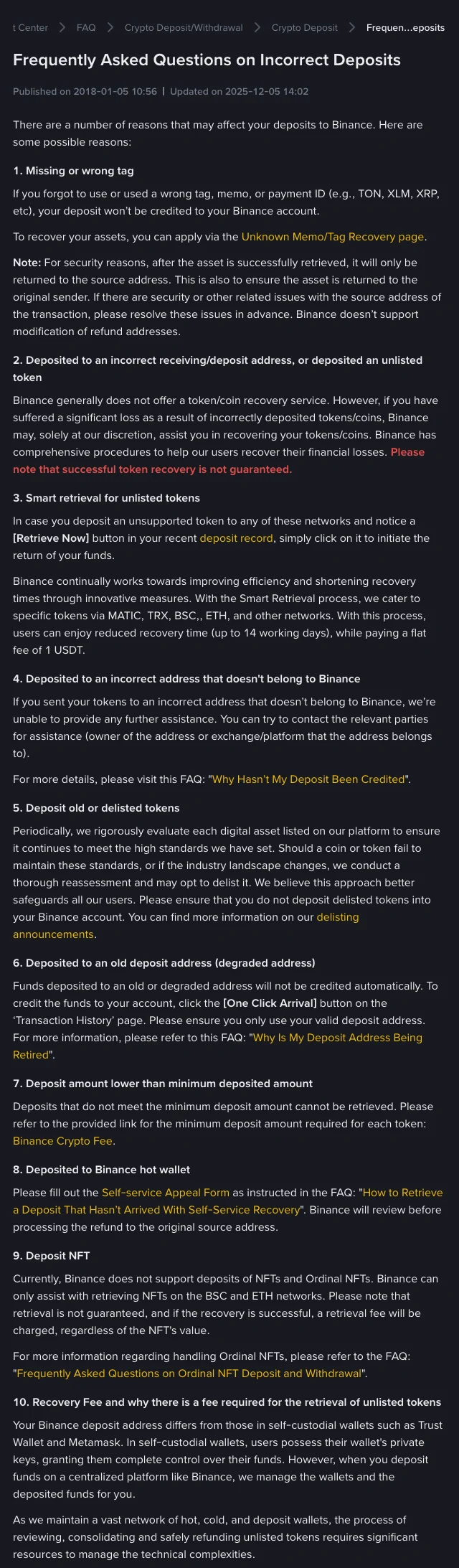
Binance Help Center, "Frequently Asked Questions on Incorrect Deposits", captured on September 29, 2026.
Depositing is free, but what happens after a mistake varies a lot. Some cases cost a recovery fee, some need an appeal form, and some cannot be fixed. Summarized from Binance's Frequently Asked Questions on Incorrect Deposits:
- Missing or wrong tag, memo or payment ID (for example TON, XLM or XRP): apply through Binance's Unknown Memo/Tag Recovery page. Once recovered, the funds are returned only to the source address. Binance does not let you change the refund address, so sort out any problem with the sending address first.
- An unsupported token, with a [Retrieve Now] button in your deposit record: click it to start Smart Retrieval. Binance says this covers specific tokens on networks such as MATIC, TRX, BSC and ETH, takes up to 14 working days, and costs a flat 1 USDT fee.
- Wrong receiving address or an unlisted token, with no retrieval button: Binance generally does not offer a recovery service. For significant losses it may help at its own discretion, and it states plainly that recovery is not guaranteed.
- An address that does not belong to Binance: Binance cannot help. You can only try the owner of that address or the platform it belongs to.
- Delisted tokens: do not deposit them. Check Binance's delisting announcements.
- An old or retired deposit address: funds are not credited automatically. Use the [One Click Arrival] button on the Transaction History page, and use only your current deposit address from then on.
- An amount below the minimum deposit: cannot be retrieved.
- Sent to a Binance hot wallet address: fill in the Self-service Appeal Form. Binance reviews the case before refunding to the original source address.
- NFTs, including Ordinal NFTs: Binance does not support NFT deposits. It can only help retrieve NFTs on the BSC and ETH networks, retrieval is not guaranteed, and a retrieval fee is charged if it succeeds, regardless of the NFT's value.
For more wrong-network and wrong-address cases and how to handle each one, see our guide to recovering crypto sent to the wrong network or address.
5 checks before you deposit to Binance
These take under a minute and prevent most of the problems above:
- Coin and network: after choosing the coin on Binance's deposit page, confirm the sending platform supports the same network.
- Address: after pasting, compare the first and last several characters to catch clipboard-swapping malware.
- Memo or tag: if the deposit page asks for one, include it. A missing memo is one of the most common deposit accidents.
- Amount: make sure the amount that will arrive, after the sender's fee, is above the minimum deposit.
- Test transfer: the first time you use a new address or network, send a small amount, wait for it to arrive, then send the rest.
For a fuller item-by-item list, use the pre-transfer checklist for network, address and memo.
Deposits are free; withdrawals are where the cost is
On Binance's side, depositing costs nothing. The fee you actually pay comes later, when you move funds out: a flat withdrawal fee per coin and network that does not depend on the amount. For how it is calculated, the minimum withdrawal amounts and when internal transfers are free, read how Binance withdrawal fees work.
FAQ
Does Binance charge a fee to deposit USDT?
Not on Binance's side. The fee page states that Binance does not charge deposit fees. The platform you send from may charge a withdrawal fee, and sending from your own wallet costs an onchain network fee.
Where can I find Binance's minimum deposit amount?
On the Fee Rate page under Deposit/Withdrawal → Crypto, search for the coin. The Minimum Deposit column is listed separately for each network. The deposit page also shows it once you choose a coin and network.
What happens if I deposit less than the minimum?
According to Binance's help center, the deposit will not be credited and cannot be retrieved.
I forgot the memo. Can I get my deposit back?
You can apply through Binance's Unknown Memo/Tag Recovery page. If it is recovered, the funds go back to the source address only.
Does Binance charge to recover a wrong deposit?
Smart Retrieval for eligible unsupported tokens has a flat 1 USDT fee, and successful NFT retrievals carry a retrieval fee. For other cases, whether recovery is possible and what it costs depends on the specific application page, and Binance does not guarantee that every case can be recovered.
Official sources
- Binance: Deposit and withdrawal fees: the statement that Binance does not charge crypto deposit fees, plus minimum deposit amounts per coin and network. Checked September 29, 2026.
- Binance Help Center: Why Hasn't My Deposit Been Credited?: the five reasons a deposit may not arrive. Published January 3, 2018; updated December 19, 2025.
- Binance Help Center: Frequently Asked Questions on Incorrect Deposits: which incorrect-deposit cases can be recovered, plus the scope and fee of Smart Retrieval. Published January 5, 2018; updated December 5, 2025.
This article is for learning purposes only. Onchain transfers generally cannot be reversed, and product and feature availability varies by region.