
Guides
Binance Withdrawal Fees Explained: How the Flat Network Fee Works (2026)
How Binance withdrawal fees work: a flat fee per withdrawal set by coin and network, why it changes with congestion, how minimums apply, and when transfers to other Binance users are free.
Last verified: September 27, 2026. This independent educational guide is not affiliated with Binance and is not financial, legal or tax advice. Fees, minimums and available networks change without notice and can differ by region. The fee shown on your own withdrawal screen is the one that applies.
Binance withdrawal fees confuse people for one simple reason: they do not behave like a trading fee. There is no percentage of the amount you send. Instead, each withdrawal pays a flat fee that depends on the coin and the network you pick. That fee can change with network conditions. Once you understand that, it becomes clear why the same USDT withdrawal can cost very different amounts, why small withdrawals feel expensive and why sending to another Binance user can cost nothing at all.
This guide explains how the fee is set, where to check it before you confirm and what actually lowers it.
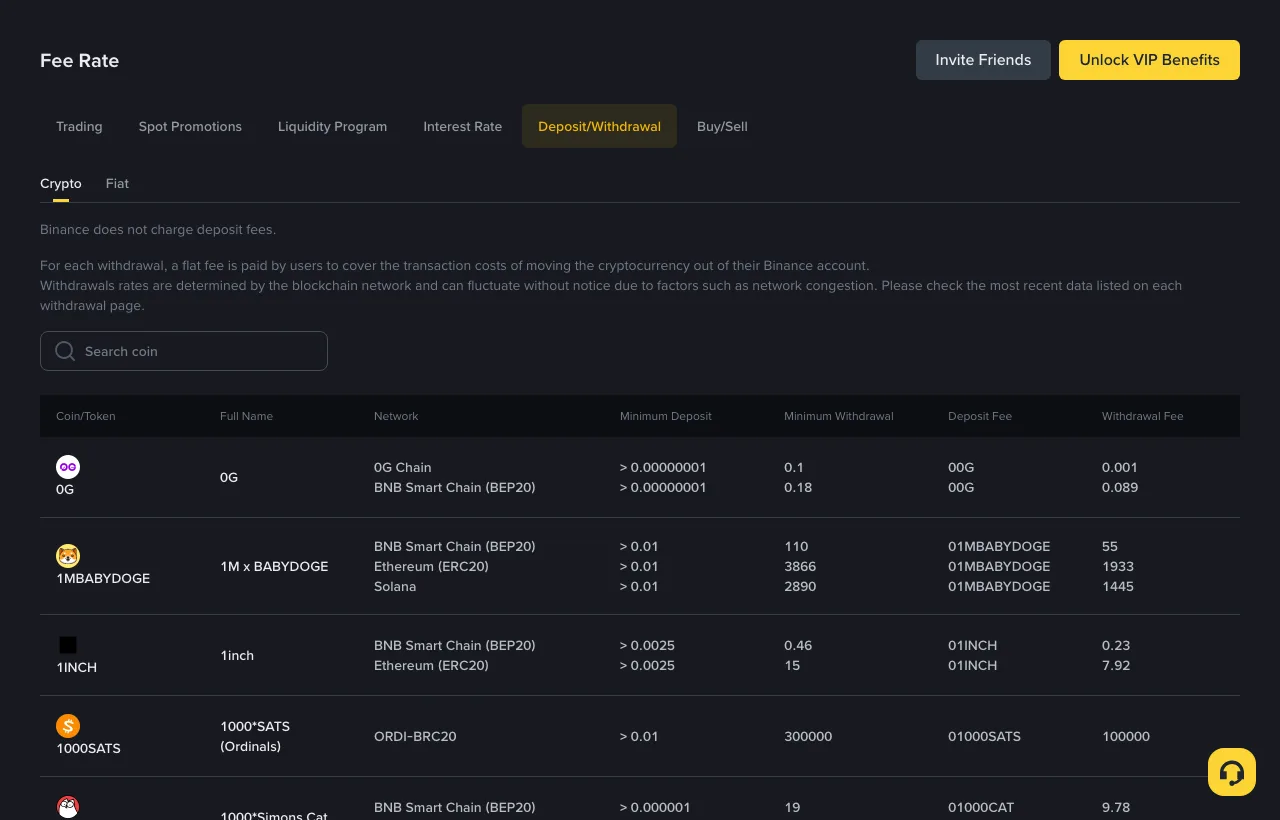
Screenshot of Binance's public Deposit & Withdrawal fee page, captured September 27, 2026, signed out. The figures in the table belong to Binance and change over time.
What Binance charges on deposits and withdrawals
Binance's fee page states two things at the top of the crypto Deposit/Withdrawal tab:
- Deposits: "Binance does not charge deposit fees." The wallet or exchange you send from may still charge its own withdrawal or network fee. That cost sits on the sending side, not with Binance.
- Withdrawals: "For each withdrawal, a flat fee is paid by users to cover the transaction costs of moving the cryptocurrency out of their Binance account." The page adds that these rates are determined by the blockchain network and "can fluctuate without notice".
So for a normal crypto withdrawal, you are dealing with one flat fee per request, set per coin and per network.
Why the fee is flat instead of a percentage
Binance's help article on withdrawal fees explains the reasoning. Sending crypto to an address outside Binance requires an on-chain transaction, and that transaction has a network fee. In Binance's words, "this fee is not paid to Binance but miners or validators". Because network fees move with congestion, Binance charges "an estimate of the network transaction fees" and asks users to check the fee shown on the withdrawal page.
The practical consequence matters more than the theory. The fee does not scale with the amount you send. Withdrawing a small amount and a large amount of the same coin on the same network costs the same fee. That leads to two habits worth adopting:
- Batch small withdrawals. Ten small withdrawals pay the fee ten times. One larger withdrawal pays it once.
- Compare the fee with the amount. On a small withdrawal, a network fee that looks tiny in absolute terms can be a meaningful percentage of what you send.
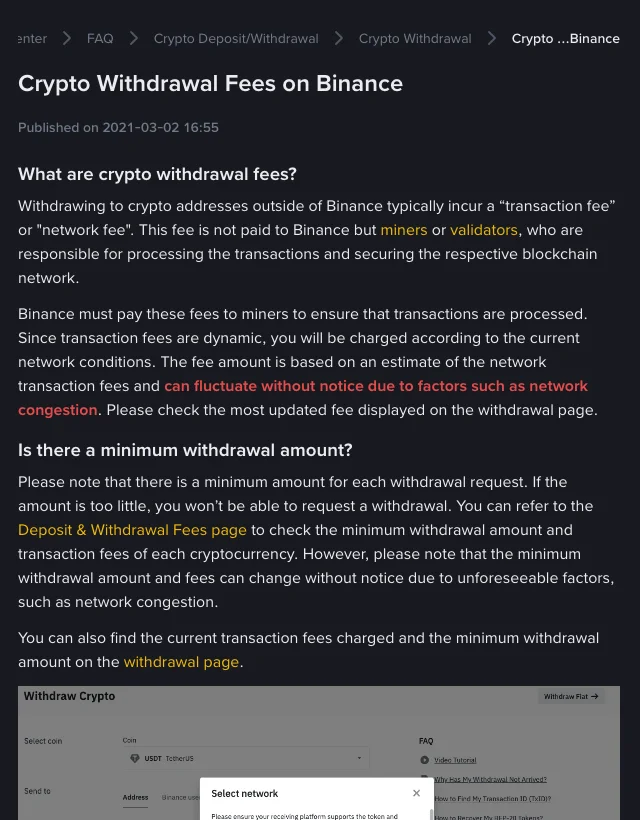
Binance's help article on crypto withdrawal fees, captured September 27, 2026. Page first published March 2, 2021.
Network choice: the biggest lever, with one hard rule
Many coins, especially stablecoins such as USDT, can be withdrawn on several networks, and the fee differs between them. That makes the network the largest single factor you control.
Binance attaches a clear warning to this in its help article: do not simply pick the cheapest option. You must select a network that the receiving address supports. If you choose a network the destination does not support, Binance warns that "your funds might be lost and cannot be recovered".
A safe order of operations:
- Ask the receiving platform or wallet which networks it accepts for that coin.
- On Binance's withdrawal screen, keep only the networks that appear on both lists.
- Among those, compare the fee and pick the lowest.
- For a first transfer to a new address, send a small test amount first.
If you want a step-by-step check before sending, use our pre-transfer mistake-prevention checklist. If a transfer has already gone to the wrong network, see recovery odds for wrong-network deposits. For why the same stablecoin costs different amounts on different chains, read why USDT network fees differ.
Minimum withdrawal amounts
Every coin and network also has a minimum withdrawal. Binance says that if the amount is below it, "you won't be able to request a withdrawal". Like the fee, the minimum can change without notice. It is listed next to the fee on the Deposit & Withdrawal fee page and on the withdrawal screen itself.
If a withdrawal button stays disabled or an error appears when you enter a small amount, the minimum is the first thing to check.
Internal transfers between Binance accounts are free
There is one way to move crypto without a withdrawal fee: an internal transfer to another Binance user. Binance's FAQ states that "internal transfers have zero transaction fees and transfers are credited immediately."
You can send by Binance ID, email or phone number. You can also enter a deposit address, provided it belongs to a Binance account. Binance adds an important condition: "fee exemption and instant fund arrivals are only applicable when the recipient's address belongs to a Binance account." If you choose an on-chain withdrawal instead, the funds go through the blockchain and the network fee applies.
This is useful between your own accounts or when paying someone who also uses Binance. Always confirm the recipient's details first, because an internal transfer is still a transfer of your funds.
How to check the exact fee before you confirm
The fee table is a good reference, but the withdrawal screen is the final quote. A simple routine:
- Look up the coin on Binance's Deposit & Withdrawal fee page and note which networks are listed.
- Open the withdrawal screen, choose the coin, paste the address and select the network. The screen shows the fee and the minimum for that network.
- Read the amount that will actually arrive. It is the amount you enter minus the fee. Check it matches what the recipient expects.
- Re-check after a delay. If you prepared the transfer earlier, confirm the fee again, since it can change with network conditions.
If a withdrawal has been sent but not received, follow our guide to tracing a withdrawal with the TXID.
Checklist: paying less on Binance withdrawals
- Combine several small withdrawals into one.
- Compare fees only across networks the destination actually supports.
- Use an internal transfer when the recipient is on Binance.
- Stay above the minimum withdrawal so the request is accepted.
- Do not choose a network only because it is cheap. A lost transfer costs far more than any fee.
Withdrawal fees are separate from trading fees. For spot trading costs, BNB fee payment and VIP tiers, see how to reduce Binance trading fees. To compare how another exchange handles withdrawals, read OKX withdrawal fees explained.
Frequently asked questions
Does Binance charge a percentage of my withdrawal?
No. For crypto withdrawals, Binance's fee page describes a flat fee per withdrawal, set by coin and network. The amount you send does not change the fee.
Why did the fee change since yesterday?
Binance bases the fee on an estimate of current network costs. Binance says the fee can fluctuate without notice due to factors such as network congestion.
Is sending crypto to a friend on Binance free?
Yes, if it goes as an internal transfer to a Binance account. Binance states internal transfers have zero transaction fees. An on-chain withdrawal to the same person would pay the network fee.
Does Binance charge me to deposit crypto?
Binance says it does not charge deposit fees. The platform or wallet you send from may charge its own fee.
Which network is cheapest for USDT?
It varies over time and by region. Check the live fees on the withdrawal screen, and only choose a network the receiving address supports.
Official sources
- Binance: Crypto Deposit & Withdrawal Fees: deposit policy, flat withdrawal fee, per-network minimums and fees; checked September 27, 2026.
- Binance: Crypto Withdrawal Fees on Binance: why the fee exists, network-selection warning and minimum withdrawals; published March 2, 2021.
- Binance: How to Make an Internal Transfer to Another Binance Account: zero-fee internal transfers and their conditions; updated December 3, 2025.
Educational content only. Crypto transfers are generally irreversible, and product availability varies by jurisdiction.