What Is a Hot Wallet? Hot vs Cold vs Hardware Wallets and How to Use One Safely
A plain-English guide for self-custody beginners: what hot, cold and hardware wallets actually are, which job each one suits, how to split funds between them, and a six-point safety checklist for everyday hot wallets.
Published 8 min read
Updated October 7, 2026. This guide is for people who are starting to use self-custody wallets. It is security education only, not investment advice or a product recommendation. Wallet features, supported networks and security designs change over time, so check the official documentation of the wallet you actually use.
What is a hot wallet? It is wallet software that manages your private keys and signs transactions on an internet-connected phone or computer. That makes it convenient for sending crypto, connecting to apps and everyday use, but it also exposes you to more risk from compromised devices, malicious browser extensions, malware and phishing pages. A cold wallet keeps key generation and storage offline as far as possible, which makes it better suited to the job of long-term storage.
If you are still unsure how wallets, addresses, private keys and onchain assets relate to each other, start with our explainer on the difference between an exchange account and an onchain wallet. A wallet is not a container that holds your coins inside an app; the assets are recorded on the blockchain, and the wallet manages your keys, shows your balance and signs actions on your behalf.
Hot, cold and hardware wallets are not three separate choices
"Hot" and "cold" describe how your private keys relate to the internet. "Software wallet" and "hardware wallet" describe how the wallet is built. The two pairs overlap, but they are not the same thing.
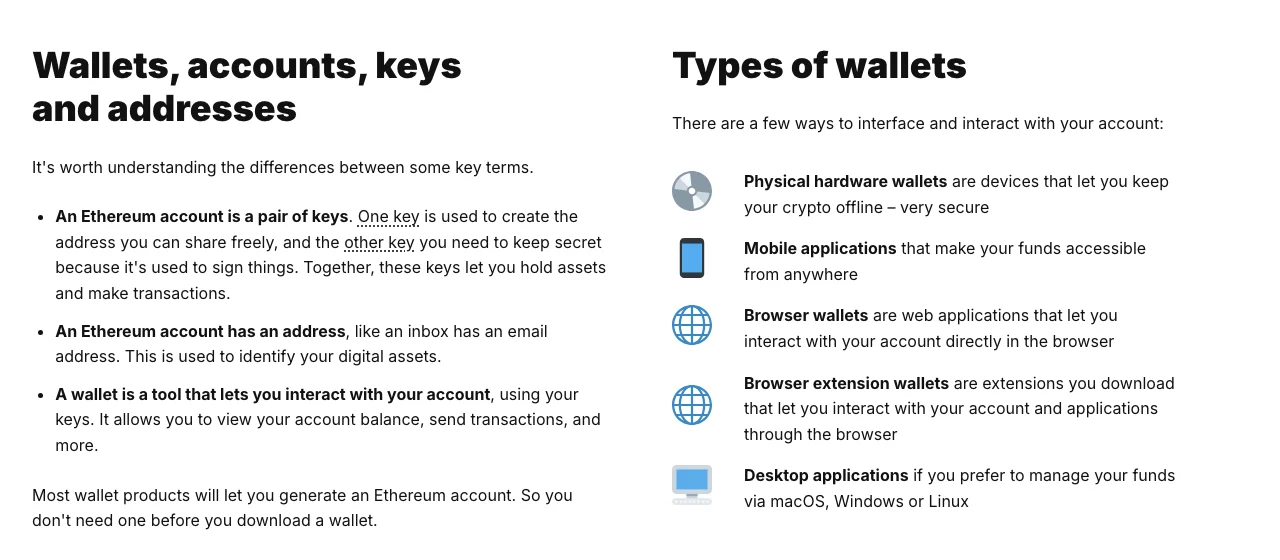
Screenshot of ethereum.org/wallets (page last updated February 24, 2026), captured October 7, 2026. Mobile, browser, extension and desktop wallets are usually hot; a hardware wallet is the common way to keep keys offline.
| Hot wallet | Cold storage / cold wallet | Hardware wallet | |
|---|---|---|---|
| Where the keys live | Usually managed in software on an internet-connected device | Generated and stored away from the internet as far as possible | Kept inside a dedicated device; signing needs on-device confirmation |
| Everyday convenience | High; good for frequent transfers and dapps | Low; the point is to move rarely and connect rarely | In between; often paired with a software interface |
| Main risks | Phishing, malicious extensions, infected devices, signing the wrong thing | Lost backups, physical damage, mistakes during recovery | Fake devices from unofficial sellers, leaked recovery phrase, signing what you cannot read |
| Best used for | Small, active balances and trying new apps | Long-term holdings with minimal online exposure | Keeping keys offline while still signing occasionally |
A hardware wallet is the usual way to set up cold storage, but owning one does not automatically make an address "cold". If the same address regularly connects to unfamiliar dapps, approves token contracts or signs requests you do not understand, the device still makes it much harder for someone to read your private key remotely, but it cannot judge whether a signature is harmful. What matters is how the key was created and stored, and what that address is used for day to day. Ledger Academy makes a similar point: it calls it a common misunderstanding that a cold wallet is simply the opposite of a hot wallet, and describes a cold wallet as one that also stays away from smart-contract interactions.
Who should use a hot wallet?
A hot wallet's value is low friction. A mobile app, desktop program or browser extension lets you check balances, send funds and use onchain applications in seconds. For someone who interacts often, it works like the cash in your pocket, not like a safe.
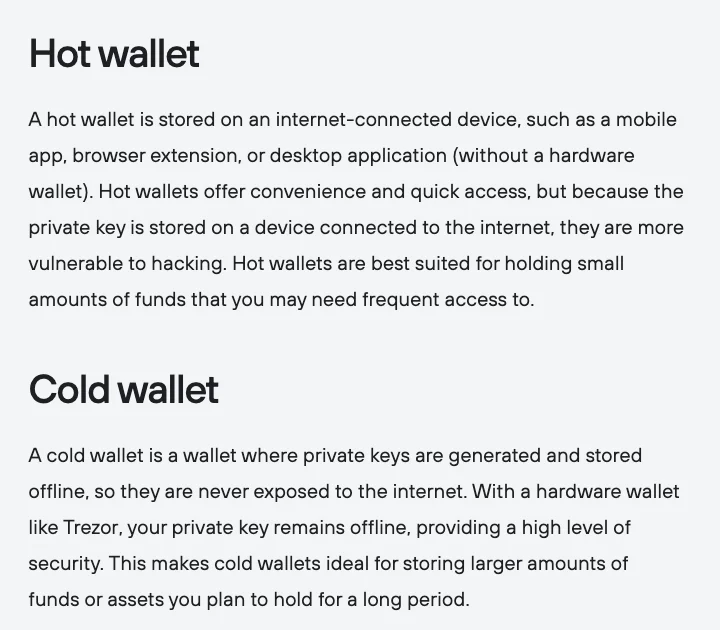
Screenshot of Trezor Learn, "What is a hardware wallet?", captured October 7, 2026. Note that this is a wallet maker's own explanation.
The safer habit is to keep only what you expect to use soon in a hot wallet, rather than piling everything into an address that connects to websites all the time just because it was easy to install. There is no single right amount for everyone. A practical line: if this wallet were drained today, the loss should be something you could live with.
What problem does a cold or hardware wallet solve?
The core benefit of cold storage is fewer chances for your private key to sit on an internet-connected device. Ethereum.org describes physical hardware wallets as devices that let you keep your crypto offline. Trezor's documentation explains that when you start a transaction, the details are sent to the hardware wallet, which signs it inside the device with your private key. MetaMask's hardware wallet guide describes the same flow from the other side: MetaMask passes the transaction to the device, the device signs it, and MetaMask broadcasts the signed result. MetaMask also recommends generating a fresh recovery phrase on the device rather than importing one that has already existed on an online computer.
Offline keys do not remove every risk, though. If you copy the recovery phrase wrongly or lose it, you may be unable to restore the wallet. If you buy a device from a fake store, type the recovery phrase into a website or follow "support" instructions from a stranger, you can still lose control of the funds. And if you approve a malicious transaction, the device will faithfully sign it. Cold storage shrinks specific attack surfaces; it does not reduce risk to zero.
How to choose: start from the task, not the brand
Four questions help:
- Will this address connect to dapps often? Frequent interaction belongs in a separate hot wallet.
- Will you need these funds soon? Money you will not touch for a long time is a better fit for minimal online exposure.
- Can you already back up and restore a wallet safely? Do not move important funds before you have practised recovery.
- Can you read the address, amount and signature type shown on the device screen? If not, practise with an empty or very small account first.
For most beginners, layering works better than picking one side. Use one everyday hot wallet for learning and interacting with apps, and a separate storage wallet that never connects to unfamiliar sites and only receives funds or makes carefully checked transfers out. Give the two wallets different recovery phrases, and do not keep both in the same cloud backup. That way a bad signature on the everyday address does not automatically spread to everything you own.
Hot wallet safety checklist
1. Install only from official sources
Check the domain and the app publisher yourself. Do not install wallets from group chats, direct messages, ad links or a "support file" someone sends you. Bookmark the official site, and update only through the official app store or the wallet's own update mechanism.
2. Never put your recovery phrase into a website or chat
A recovery phrase can rebuild full control of a wallet. MetaMask's help center warns plainly that you should not share the phrase with anyone because those words can be used to steal all of your accounts, and that MetaMask cannot retrieve it for you if it is lost. Ethereum.org gives the same advice: write it down, keep it safe and do not store it on a computer. That rules out screenshots, cloud drives, email, saved chat messages and online documents. For the full reasoning and backup rules, see our guide on why seed phrases and private keys should never be screenshotted or shared.
3. Treat "connect wallet" and "sign" as different actions
Connecting to a site usually just lets it read your public address. Signing messages, granting token approvals and sending transactions can change what happens onchain. When a pop-up appears, do not confirm on reflex. At minimum, check the site domain, the active account, the destination address, the amount, the network and who is receiving the approval. If you cannot understand the request, reject it and verify through the project's official documentation.
4. Give your everyday address a clear job
Use a different address from your storage wallet for testing new dapps, claiming tokens of unknown origin and high-frequency activity. Review token approvals you no longer need from time to time, but do not trust "approval cleaner" tools sent to you in a DM; open approval tools only from your wallet or a block explorer you already trust.
5. Protect the device the wallet runs on
Turn on screen lock and disk encryption, and install security updates for the operating system, browser and wallet promptly. Do not import a wallet on public computers or unknown remote machines. Every extra browser extension adds attack surface, so a separate, minimal browser profile for crypto is usually easier to keep clean.
6. Test the path before your first real transfer
Send a small amount you could afford to lose, confirm the network, address and arrival, and only then send the rest. After pasting an address, compare more than the first and last few characters. If you use a hardware wallet, treat the address shown on the device screen as the final check. Onchain transfers usually cannot be reversed by customer support the way a bank payment sometimes can.
Three common misconceptions
"Hot wallets are inherently unsafe." A hot wallet is not a scam by nature; it is the right tool when convenience matters. The trouble starts when all of your funds sit in an address that interacts constantly, or when device and signing risks are ignored.
"Plugging a hardware wallet into a computer puts the private key online." A well-designed hardware wallet signs inside the device, and the private key should never leave it. The computer still displays the transaction, though, and malware can try to trick you into approving the wrong thing. Always check against the device screen.
"As long as my recovery phrase is secret, I'm completely safe." Malicious approvals, sending to the wrong address, fake support agents and address-swapping tricks can all cost you money without the phrase ever leaking. Our roundup of common Web3 scams, from fake support to approval traps covers the typical scripts and what to check.
What to do if you think a hot wallet is compromised
Stop signing anything. Do not share your screen or recovery phrase with any "technical support" that contacts you first. On a device you trust, create a brand-new wallet with a new recovery phrase from an official source, and move whatever funds you still control into it. Once a recovery phrase has been typed into a website, a chat or an unfamiliar device, it should never again protect savings. Afterwards, review the old address's approvals and transaction history, and keep the transaction hashes in case you need to explain what happened to a legitimate platform or to law enforcement.
Bottom line
Hot wallets are for convenience, cold storage is for reducing online exposure, and hardware wallets are a practical way to keep keys offline while still being able to sign. You do not need to get every tool right on day one. Separating funds by purpose, practising recovery and reading every signature carefully matter more than comparing brands.