Why Your OKX Limit Order Did Not Fill: Price, Queue Priority and Cancellation Rules
An OKX limit order can remain open after the chart touches your price because execution also depends on the opposite side of the book, queue position, available quantity, and instructions such as Post Only, IOC, or FOK. This guide gives beginners a practical troubleshooting sequence.
Published 3 min read
Why did your OKX limit order not fill even though the chart touched your price? Usually, the order is working as designed. A limit order sets the worst price you will accept; it does not guarantee that enough opposite-side liquidity will reach your place in the queue.
This guide covers OKX spot orders. Product availability and labels vary by region and account, so treat your own order details as final. If order types are unfamiliar, first read our beginner guide to limit, market, and stop orders.
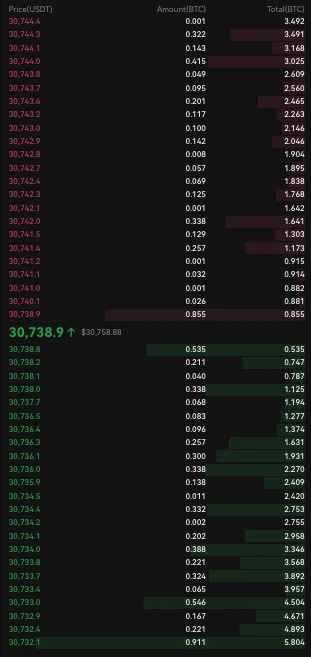
Official OKX Help Center order-book example. Red rows are sells and green rows are buys; the figures are illustrative.
The last price does not promise a fill
The last price is the most recent completed trade. It does not mean every order waiting at that number traded. A limit buy can match sellers at your limit or lower; a limit sell can match buyers at your limit or higher. Execution also depends on available quantity and your place behind other orders at the same price.
OKX's current limit-order help page states that the market reaching your limit does not necessarily mean your order filled. If available quantity is insufficient and price moves away, the remainder stays open.
Five common explanations
1. Wrong side or wrong market
A buy must meet the ask side; a sell must meet the bid side. A candle alone hides that distinction. Also verify the exact product and pair: BTC/USDT spot and a BTC perpetual have separate order books.
2. Other orders were ahead
Some quantity can trade at your price without reaching every waiting order. Canceling and replacing is not a shortcut. OKX says changing price or size requires a new order, which receives a new submission time and queue position.
3. Only part of the quantity was available
If you request 1 BTC but only 0.2 BTC can match within your limit when the order is reached, 0.2 BTC may fill and 0.8 BTC may remain open. Check requested, filled, and remaining quantities separately. One order can create several executions and fee records; our OKX partial-fill reconciliation guide explains how to inspect them.
4. An advanced instruction canceled it
| Instruction | Required behavior | Why it disappears |
|---|---|---|
| Post Only | Must rest as maker | Canceled if it would match immediately |
| FOK | Fill completely now | Canceled if eligible quantity is insufficient |
| IOC | Fill available quantity now | Unfilled remainder is canceled |
Check the instruction, final status, and filled amount in order history before resubmitting.
5. Funds are reserved, or protection applied
An open buy reserves quote currency; an open sell reserves the asset being sold. It remains in total balance but is unavailable elsewhere until fill or cancellation. OKX also publishes price-protection and price-limit rules that can cancel quantity when execution would move too far from the current book. Read the recorded cancellation reason before assuming a malfunction.
Troubleshoot in this order
- Confirm Spot, the pair, and buy or sell direction.
- Record limit price, requested size, filled size, remainder, instruction, time, and status.
- For a buy inspect asks; for a sell inspect bids.
- If the order vanished, check Post Only, IOC, FOK, manual cancellation, or a system reason.
- Expand fill details; a partial order can contain multiple trades.
- Decide whether to wait or replace. A replacement loses the old queue position; a market order prioritizes speed but accepts spread and slippage.
Limit does not automatically mean maker
“Limit” describes a price boundary, not the fee role. A limit buy crossing the best ask, or a limit sell crossing the best bid, can execute immediately as taker. Quantity that rests and trades later is maker execution. Post Only prevents immediate taker execution by canceling the order if it would cross the book. See our OKX maker-versus-taker fee guide for the fee effect and where to check your account rate.
Quick answers
Why did the candle touch my price but my order stay open? Quantity may have been consumed by orders ahead of yours.
Why was only part filled? Only part of the requested quantity was available within your limit. The rest stays open unless a cancellation instruction applies.
Why did Post Only disappear? It allows maker execution only, so OKX cancels it if it would match immediately.
Does canceling cost a trading fee? OKX says canceling an unfilled order is free. A partial fill can still carry fees on executed quantity; the canceled remainder is not a trade.
Official sources
Checked October 6, 2026:
- OKX: What's a limit order?, updated September 9, 2026.
- OKX: Basic Order Types, updated August 18, 2026.
- OKX: How do I trade with different order types?.
This independent educational guide is not affiliated with OKX and is not investment advice. Rules and interface paths can change; check the current official documentation and your order record before acting.