Does OKX Charge P2P Fees? Ad Prices, Payment and Release Safety Checks (2026)
OKX charges no trading fee on P2P buys and sells, but the ad price and your bank or payment app still decide what you really pay. This guide covers how to compare ads, the buyer payment steps, the seller release rule and what to do in a dispute.
Published 7 min read
If you are about to buy crypto through OKX P2P for the first time, the "0 fees" label is the easiest thing to misread. OKX does not charge a trading fee on P2P buys or sells. Your real cost, though, still depends on the price in the ad you pick and on whatever your bank or payment app charges for the transfer.
This guide is for first-time P2P buyers and for occasional sellers who are worried about releasing crypto too early. Available currencies, payment methods and risk controls vary by region, so the rules shown in your own logged-in P2P page always take priority. Sources were checked on October 12, 2026.
Short answer: zero trading fee is not zero cost
OKX's Trading Fee Rules FAQ (question 29, updated September 9, 2026) says P2P buy and sell transactions aren't charged a trading fee. The same answer adds two details beginners often miss:
- P2P trades do not count toward your 30-day trading volume, so they do nothing for your spot or futures fee tier.
- They also do not count toward the "eligible trading volume" thresholds used in OKX campaigns.
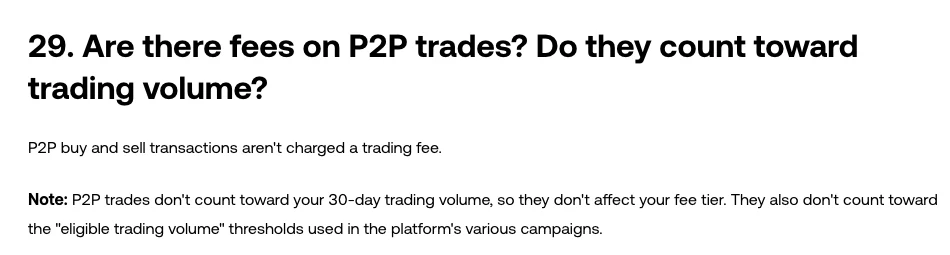
OKX Trading Fee Rules FAQ, question 29. Screenshot taken October 12, 2026.
The separate P2P Orders FAQ (updated August 11, 2026) makes the other half of the point: your bank or transfer app may charge its own fee when you send the payment.
So the number worth comparing is your effective price:
Effective price = total fiat you actually paid (including any transfer fee) ÷ crypto you actually received
Two ads can both show no platform fee and still cost you different amounts, because one has a higher unit price or because the payment method you chose adds a charge on your side. Compare the ad price, the amount you will receive and the payment fee together, not the "0 fees" badge.
Five checks before you place a P2P order
1. Confirm P2P works for your account and region
OKX help pages note that products and rules differ by jurisdiction. According to OKX's guide to buying crypto with P2P (updated September 15, 2026), verified users can only use the fiat currency of their registered region for P2P. Check the currencies, coins and payment methods on your own P2P page rather than assuming someone else's screenshot applies to you.
2. Finish identity verification and pay from your own account
The same buying guide states that identity verification is required, that the bank card used for payments and receipts must be registered in the verified account holder's name, and that payment methods from other countries are not supported. Paying through a friend's account or a card in another name is a common cause of disputes and restrictions. If your verification is still pending or was rejected, sort that out first with our guide to fixing a failed KYC verification instead of trying to resolve it while an order timer is running.
3. Compare ads, not just the top row
For each ad you consider, look at:
- the unit price and the amount of crypto you will receive for your fiat amount;
- minimum and maximum order limits;
- the payment methods the counterparty accepts;
- the ad terms, payment time limit and any extra conditions;
- the counterparty's completed orders and completion rate.
OKX's P2P price negotiation and payment rules (updated September 22, 2026) require both sides to complete the trade at the price and amount shown in the order. Asking to renegotiate after the order is placed, requesting extra payment, or adding undisclosed transfer or conversion fees is prohibited, and violations can lead to warnings or account freezes. If a counterparty asks for more money in chat, that is a reason to stop, not to negotiate.
4. Check your payment method's fee before you pay
A zero platform fee says nothing about your bank, e-wallet or cross-border transfer service. Look at the confirmation screen of your payment app for the fee and the exact amount that will leave your account. If currency conversion is involved, count the exchange-rate margin as part of the cost too. When the fee is unclear, step back and recheck rather than paying first and guessing later.
5. Lock down your account first
Set a strong unique password, turn on two-factor authentication and set up anti-phishing protection before your first trade. Our 12 safety checks before using OKX walks through confirming you are on the official app or domain. During an order, talk to the counterparty only in the order chat.
How a buyer completes an OKX P2P order
Button names vary by app version and region, but the sequence is the same:
- Open P2P from the buy crypto menu, choose Buy, then pick the coin, your fiat currency and a payment method.
- Open the ad details and check the unit price, limits, the crypto amount you will receive, the payment time limit and the ad terms.
- Enter your amount and create the order. From this point, the payment details and amount shown on the order page are the only ones that count.
- Pay the exact amount from an account in your verified name to the payment method shown in the order. Do not accept a new account number or QR code sent outside the order.
- Once your payment app shows the transfer as submitted, select "I have paid" in the order. OKX's buying guide also warns not to pay if the order is about to time out: if the timer reaches zero before payment is marked complete, the seller gets the reserved crypto back.
- Wait for the seller to release the crypto. If they go quiet or the details conflict, use the help or appeal option inside the order and keep the chat history and your payment record.
Do not cancel an order you have already paid for. OKX's P2P order cancellation page (updated September 15, 2026) says exactly that, and adds that you can cancel at most 3 orders a day before your account is blocked from placing new orders for the rest of that day. Orders cancelled by a system timeout also hurt a buyer's completion rate. One exception: if you messaged the seller in chat and they did not reply within 15 minutes, you can cancel without affecting your completion rate.
The seller's red line: trust your own account, not a screenshot
When a buyer marks an order as paid, do not treat their screenshot as proof. Open your own banking or payment app and check:
- that the money has actually arrived, not just "processing" or an SMS alert;
- that the amount matches the order;
- that the payer's name matches the verified name on the order;
- that there is no unusual note or risk warning on the incoming payment.
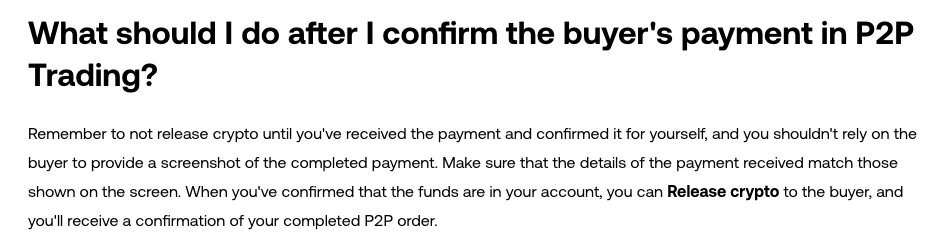
OKX's guide to selling crypto with P2P. Screenshot taken October 12, 2026.
OKX's guide to selling crypto with P2P (updated September 15, 2026) says to confirm receipt through your banking app or transaction history, not SMS notifications, and only then select Release crypto. If you have already released crypto without receiving payment, the guide says to raise a dispute directly.
In a P2P order, OKX locks and releases the crypto, but the fiat payment happens on your bank's or payment provider's rails. Treat that leg like any other transfer: check the recipient, the amount and the evidence before anything moves.
What to do when something goes wrong
The counterparty wants to move off-platform or switch payment accounts
Stop before paying. Keep the order chat and use the help option inside the order. Do not click login links, open files or share verification codes from a counterparty.
You paid, but the seller has not released the crypto
Do not pay again, and do not cancel the paid order. Check that your transfer actually went through, message the seller in the order chat, and if that does not resolve it, file an appeal with your payment proof. Hide unrelated personal details such as full card or account numbers before uploading.
The buyer sent a screenshot, but nothing arrived in your account
Do not release. A screenshot can be delayed, reversed or unrelated to this order; only your own account history proves receipt. Handle it through the order chat or an appeal.
The amount or the payer's name does not match
Do not settle the difference privately or accept a third-party payment. Submit the evidence through the order's help flow and let OKX handle it.
One-minute checklist before every order
- P2P, your fiat currency and your payment method are available on your own account.
- You compared the ad price, the crypto you will receive and your payment method's fee.
- The ad limits cover your amount and you accept its terms.
- The paying and receiving accounts are in the same name as your verified identity.
- All communication stays in the order chat; no off-platform price changes or new accounts.
- Buyers never cancel after paying; sellers never release before confirming funds themselves.
- If there is a dispute, keep evidence and use the in-order appeal.
OKX P2P really can cost you zero in trading fees, but your effective price and your safety still depend on the ad you pick, the way you pay and how carefully you confirm the money. For how other OKX funding routes compare on cost, see whether OKX charges deposit fees.
This article is educational and is not investment advice. Features and rules depend on your region; follow what your logged-in OKX app shows.
Want your own numbers? Fee calculator · Withdrawal fees